


Recently updated on April 27, 2026
Before writing a single React Native component for a cross-platform mobile surveillance app, we ran a full network scenario analysis. We identified five distinct deployment environments, four of which introduced failure modes that could have caused production issues if they were not addressed before release.
WebRTC video streams tend to fail in environments that aren’t accounted for upfront, for example, corporate WiFi with client isolation, VPN tunnels that block UDP, or reverse proxies optimized for HTTP traffic.
These real-world network conditions are often missing from initial test plans. Addressing them effectively means analyzing infrastructure before development begins, rather than reacting to issues once users start reporting failures.
This article walks through all five scenarios from our analysis, explains why each fails, and provides the infrastructure checklist that prevents it.
Why Local Testing Is Insufficient for WebRTC Systems
WebRTC was designed for peer-to-peer communication. Two devices discover each other’s public addresses through STUN, negotiate a connection through ICE, and exchange encrypted media directly. Simple, elegant, and completely insufficient for enterprise environments.
The problem isn’t the protocol itself. WebRTC handles NAT traversal, DTLS-SRTP encryption, and ICE (Interactive Connectivity Establishment) candidate negotiation natively. The problem is the networks your users actually sit on: corporate firewalls blocking UDP, VPN tunnels fragmenting video packets, WiFi access points with client isolation enabled, and reverse proxies built for HTTP that silently kill media paths.
Mobile makes it worse. Unlike desktop browsers on predictable office networks, mobile devices jump between WiFi and cellular, connect through carrier-grade NAT (CGNAT), and run inside VPN tunnels written by IT departments that never considered real-time media when drafting their security policies.
The fix is in a network scenario analysis conducted before development starts, covering every environment your users will actually connect from. We ran this analysis before any React Native development on a video management system mobile client, and it directly shaped the infrastructure contract we handed to the backend team.
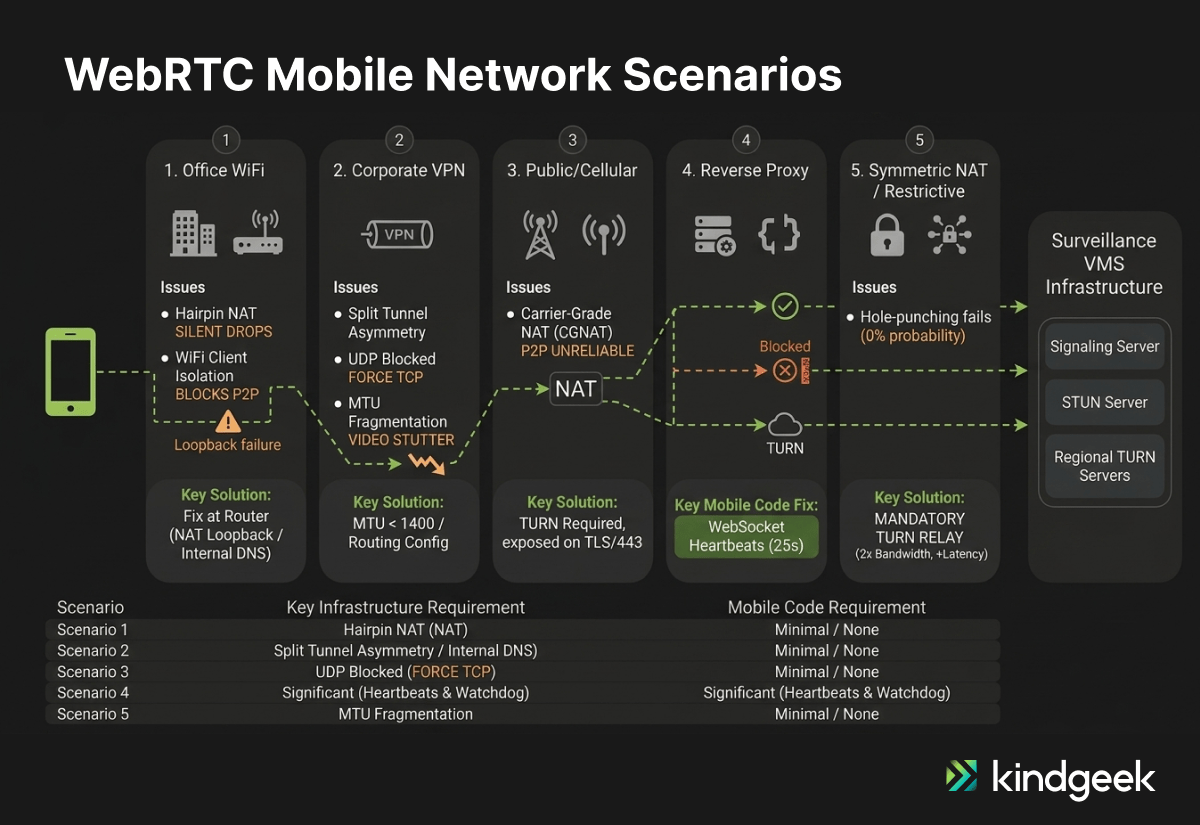
Scenario 1: Office WiFi — NAT Loopback and Client Isolation
Picture this: a mobile app and a VMS (Video Management System) server sit on the same corporate WiFi network. Direct P2P should work perfectly. It often doesn’t for these reasons:
Issue 1: NAT Loopback / Hairpin NAT
When P2P fails and the mobile client tries to reach a public TURN server, traffic exits to the internet and re-enters the same network. This is called hairpin NAT (or NAT loopback). On routers that support it, the traffic hairpins back inward: inefficient (double bandwidth, added latency) but functional. On routers that do not support it, the firewall drops the connection outright with no error signal, making that fallback path unusable.
Issue 2: WiFi Client Isolation
Many enterprise access points block device-to-device communication by default, forcing all traffic through TURN even when both devices share the same subnet.
Solution
The fix is infrastructure-level. Confirm that your firewall supports NAT loopback, or implement split-horizon DNS so internal clients resolve TURN to an internal address.
If your mobile application uses certificate pinning, ensure the internal TURN server’s TLS certificate is signed by a CA included in your pin set. A pinning mismatch will block the TURNS connection before the relay is established. (Note: this is an additional hardening consideration beyond the core network analysis and applies when certificate pinning is already part of your security posture.)
Disable WiFi client isolation for your VMS VLAN. Allow mDNS (UDP 5353) for host candidate gathering. On our surveillance app engagement, the scenario analysis identified both issues with zero mobile code changes required.
Scenario 2: VPN Tunnels — UDP Blocking and Packet Fragmentation
Remote workers connecting through corporate VPNs introduce four distinct failure modes for WebRTC video streaming.
Split Tunneling
When split tunneling is disabled, all WebRTC traffic routes through the VPN tunnel, adding latency, consuming bandwidth. When enabled, WebRTC traffic may bypass the VPN entirely, creating routing asymmetry where some ICE candidate pairs become unreachable. Neither option works without deliberate configuration.
UDP Blocking
Many corporate VPNs block or poorly handle UDP traffic. WebRTC prefers UDP for real-time media. Forced TCP fallback degrades latency and video quality significantly.
Double Encryption Overhead
WebRTC already encrypts via DTLS-SRTP. A VPN adds a second encryption layer, increasing CPU usage on mobile devices. This is unavoidable overhead, an accepted trade-off when VPN access is mandatory. Plan for it in your hardware requirements documentation.
MTU Fragmentation
VPN encapsulation headers shrink the effective packet size. Video packets exceeding the reduced MTU fragment in transit, causing stuttering, black frames, or complete stream failure. The fix: cap MTU at 1,400 bytes or lower to prevent fragmentation.
For mobile clients, bitrate capping can also reduce fragmentation risk. Capping around 500 kbps via setParameters() is a VPN-specific resilience optimization that limits packet size at the source before encapsulation headers come into play.
On our engagement, the mobile developers needed zero additional mandatory code changes. The work sat entirely in network configuration and routing rules delivered by the DevOps checklist, with the bitrate cap available as a resilience improvement for VPN-heavy deployments.
Scenario 3: Public Internet — STUN/TURN Dependency and CGNAT Behaviour
Remote mobile clients on home WiFi, cellular data, or public hotspots face standard NAT traversal. STUN discovers the public IP. ICE negotiates the connection. TURN relays when direct P2P fails. This is the textbook WebRTC scenario and the one most teams under-engineer.
Cellular networks frequently deploy carrier-grade NAT (CGNAT), which makes direct peer-to-peer unreliable for a meaningful portion of mobile users, making TURN a production requirement rather than an optional fallback. The critical infrastructure requirement: expose TURN on TLS port 443. Many mobile carriers and public WiFi networks block non-standard ports, and placing your TURN server on 443 ensures traffic passes through the broadest range of network environments.
A “silent freeze” detector on the mobile side adds resilience. Use the WebRTC getStats() API as a watchdog: monitor incoming bytes per second, and if the counter flatlines while the connection reports “connected”, trigger an ICE restart. This catches carrier network instability that doesn’t produce a clean connection failure event.
Scenario 4: Reverse Proxy — When Signaling Works but Media Dies
Reverse proxy architectures create a subtle failure mode: everything appears to work until you try to stream video.
The root cause is protocol mismatch. Reverse proxies are built for HTTP/TCP traffic. WebRTC signaling (the offer/answer exchange) runs over HTTPS or Secure WebSockets, so it passes through the proxy without issues. The media stream, however, runs over UDP. The proxy can’t handle it.
This means you must separate signaling and media paths. The reverse proxy handles WebSocket signaling. The TURN server handles UDP media. Both paths operate independently.
The mobile-specific requirement here is WebSocket heartbeats. Reverse proxies often time out idle WebSocket connections, and a surveillance app where the user passively monitors a camera feed can appear idle to the proxy even while media continues over a separate UDP channel.
The 25-second ping/pong interval in our implementation is deliberate, staying well within the timeout thresholds we have seen in production environments. Without it, the proxy terminates the signaling connection while video continues over UDP, creating a failure mode that presents as a frozen stream with no explicit error on either side.
The reverse proxy DevOps checklist for this scenario also includes: confirming WebSocket upgrade support is enabled on the proxy, valid TLS termination with backend re-encryption if required, firewall rules permitting both proxy ingress and TURN port traffic, and confirming the proxy does not strip or filter ICE-related headers from the signaling path.
This is the most critical scenario where mobile code must accommodate infrastructure limitations. While other scenarios use code for optimization and resilience (like watchdogs or Trickle ICE), Scenario 4 will fail completely without explicit heartbeat logic.
Scenario 5: Full TURN Dependency — When Peer-to-Peer Traversal Fails
Some network configurations make direct P2P non-viable. In this scenario, network policy constraints, such as symmetric NAT combined with restrictive firewall policies, mean the architecture should assume all media traverses TURN. There is no reliable hole-punching path, and the infrastructure plan must account for this from the start.
The infrastructure implications are significant. TURN processes every byte of video traffic, consuming bandwidth on both ingress and egress, effectively 2x the video bandwidth at the relay. For a surveillance app streaming multiple concurrent camera feeds, this adds up fast. Each concurrent video stream requires provisioned relay capacity.
In our network analysis for this engagement, the extra relay hop adds 20-50ms of latency. When users expect near-instant feedback, this added delay makes PTZ (Pan/Tilt/Zoom) control feel sluggish and imprecise. Regional TURN nodes are therefore not optional; they are required for responsive hardware control.
TURN also becomes a single point of failure. Deploy redundant instances with load balancing. For globally distributed users, deploy regional TURN servers to minimize latency.
The mobile client can force relay-only mode using iceTransportPolicy: ‘relay’ when the app detects that P2P consistently fails in a given network environment. This skips the STUN discovery phase entirely, reducing connection setup time at the cost of guaranteed relay overhead.
On the mobile side, Trickle ICE — sending ICE candidates as they are gathered rather than waiting for the full gathering to complete — speeds up connection establishment. Combined with a TURN fallback, this maximizes connection probability in even the most restrictive environments.
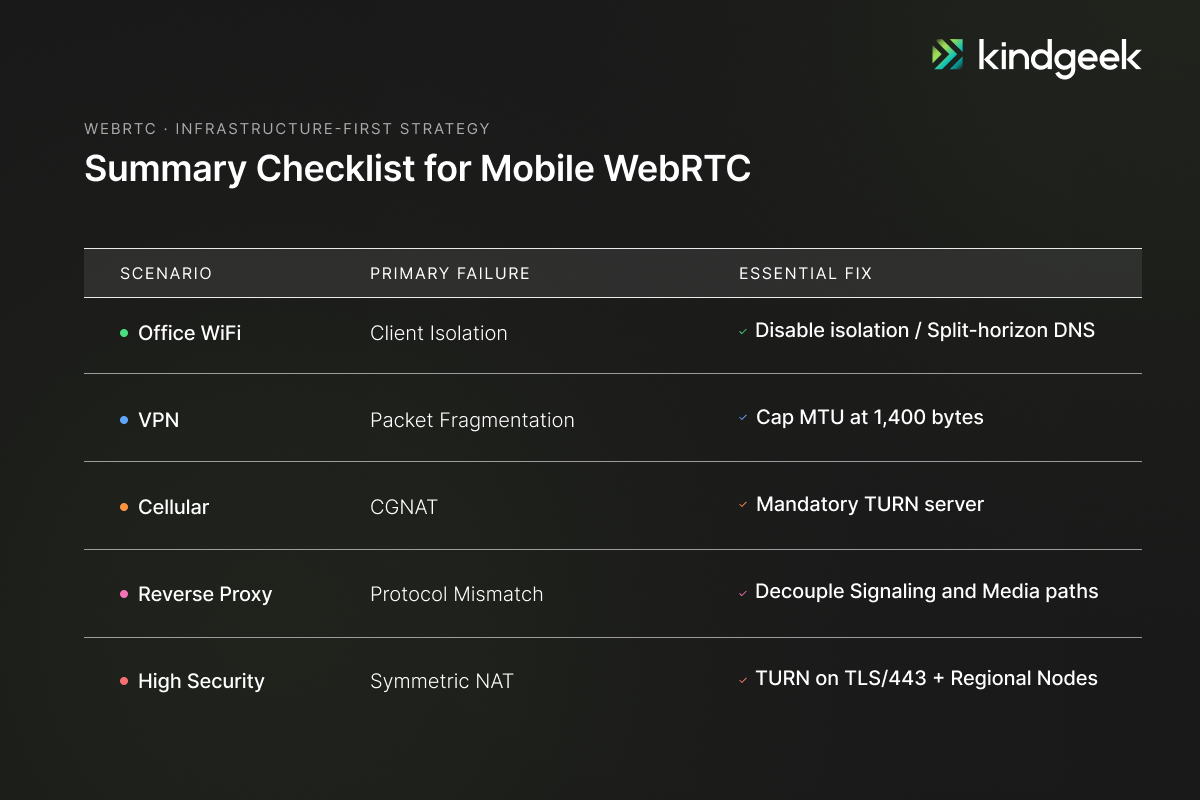
The Pattern: Fix the Network, Not the Code
Across the five scenarios, the analysis shows that most mandatory work is infrastructure-side. Reverse proxy environments are the clear exception: mobile must implement WebSocket heartbeats every 25 seconds. Other mobile-side items, including NetInfo monitoring, bitrate capping for VPN environments, getStats watchdogs, and Trickle ICE, are useful resilience improvements rather than mandatory fixes.
The real work happens in a network scenario analysis delivered before development starts. Each scenario gets a problem statement, a solution vision, a DevOps checklist, and a verdict on mobile development impact. This document becomes the contract between the mobile team and the infrastructure team. When a video stream fails in production, the analysis tells you exactly which checklist item was missed.
This approach was applied in a surveillance mobile app engagement, where we delivered a React Native cross-platform rewrite supporting up to 12 concurrent WebRTC camera streams, PTZ controls, and real-time alarm management. The analysis was delivered before development started. It defined the DevOps checklist, the infrastructure contract, and the mobile verdict for each scenario. When something breaks in production, it tells you exactly which checklist item was missed.
How do I test WebRTC in enterprise network conditions?
Use a three-layer approach: Jest with custom RTCPeerConnection stubs for mocking ICE configurations, and MSW for intercepting signaling HTTP/WebSocket contracts at the unit level; Maestro with BrowserStack for UI stability testing on real devices; and optionally Appium with BrowserStack video injection for real media streaming tests on hardware. This is the testing architecture we deployed on our VMS mobile engagement.
What is ICE restart, and when should I implement it?
ICE restart renegotiates the WebRTC connection when network conditions change, for example, switching from WiFi to cellular. Implement it when iceConnectionState transitions to ‘failed’. As an optimisation for mobile surveillance use cases, also monitor the ‘disconnected’ state: wait 2–3 seconds, check getStats() for stalled incoming bytes, and trigger a restart proactively if the connection has not recovered, rather than waiting up to 30 seconds for “failed” to fire. On mobile, where network transitions are frequent, ICE restart is essential for maintaining uninterrupted video streams.
Can React Native handle WebRTC video streaming reliably?
React Native supports WebRTC through the react-native-webrtc library, which wraps the native WebRTC engines on both iOS and Android. The framework handles multi-stream video, PTZ controls, and real-time alarm delivery. The reliability challenges are network-side, not framework-side, which is why network scenario analysis precedes development.
Do I need a TURN server for my WebRTC mobile app?
Yes. Cellular networks use carrier-grade NAT, corporate networks block direct P2P paths, and symmetric NAT makes hole-punching impossible in certain configurations. In every engagement we run involving real-time mobile video, TURN ends up in the infrastructure. Without it exposed on TLS/443, a subset of your users will get no video at all in restrictive environments. TURN is not optional for production WebRTC.