


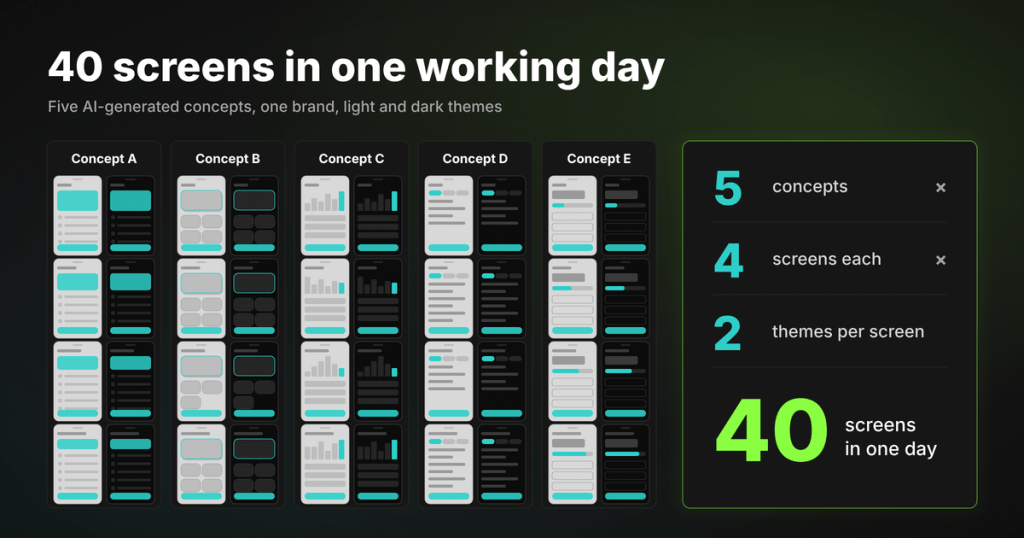
On one client project, our UI/UX designer built five distinct UI concepts in a single working day. Each one had four screens, and every screen came in both a light and a dark theme. By the end of the day, there were 40 screens on the table for the client to compare and choose from.
That’s one of her AI workflows. In the other, ideas reach real users before anyone draws them in Figma.
Both outcomes are thanks to AI prototyping, used at two key moments in the design process:
- When a client needs new concepts, AI helps to create them quickly and affordably.
- If we need to check an idea, it lets us test it with users and discard it just as easily.
We asked Olha Sliusar, UI/UX Designer at Kindgeek, to tell more about her design approach, will AI now take the designer’s job, what is Rapid AI Prototyping and how did the concept of design workflow changed after bringing AI into it.
Where AI Prototyping Saves Time, and Where It Doesn’t
Picture Olha’s day without AI. Five concepts mean 20 screens to draw by hand, and then the same 20 again in dark mode.
Figma’s own researchers recently timed exactly this kind of work, and their numbers put a rough price on that second half. Converting one screen to dark mode took the designers in their study about eight and a half minutes on average, and they had a picture of the finished result in front of them. 20 screens at that pace come to nearly 3 hours of recolouring, before anyone has drawn the light versions or picked a favourite concept.
The same problem exists in testing. Building one interactive comment flyout took the same designers about 24 minutes on average. A clickable flow for a usability test needs many interactions like that, all built before user sees the idea. So the cost of exploring sits at the very start of a project, when the team knows least about what will work.
What the research says
Figma’s research brought us a real evidence for how much time designers can save with AI. It was a randomised controlled trial, published in September 2026, where 50 designers and 50 product managers made three usual edits to a social media app design: the dark-mode switch and the comment flyout above, plus a new “Help & Support” item in a settings menu. Half of each group used Figma Make, and the other half worked the usual way.
| Among those who completed the tasks | Result with Figma Make |
|---|---|
| Everyone working with AI | Finished noticeably faster, taking about one fifth less time on average |
| Product managers | Saved the most, cutting their total time by 35% |
| Designers: interactive comment flyout, the longest and most complex of the three tasks | 26% faster, the only task where designers improved significantly |
| Dark-mode conversion | AI made no significant difference for either group |
Why scale matters
With one prompt applied to one screen designer saves very little. The experiment above measured single, well-defined edits, that a skilled designer makes fast by hand. Olha’s workflows run at a different scale. She works with twenty screens at a time, explores five directions side by side, or builds a whole clickable flow for testing.
Rapid prototyping with AI pays off once the job is right size.
The study’s authors spell out its limits. Participants worked from a reference image of the finished result, so the trial measured how fast people reached a known target. The real project also has ambiguity and changing requirements, which also add some work to the scope.
AI Rapid Prototyping: How Five Concepts Got Built in One Day
Olha starts her concepts outside Figma. Figma is where the result gets refined. Here is her pipeline, step by step.
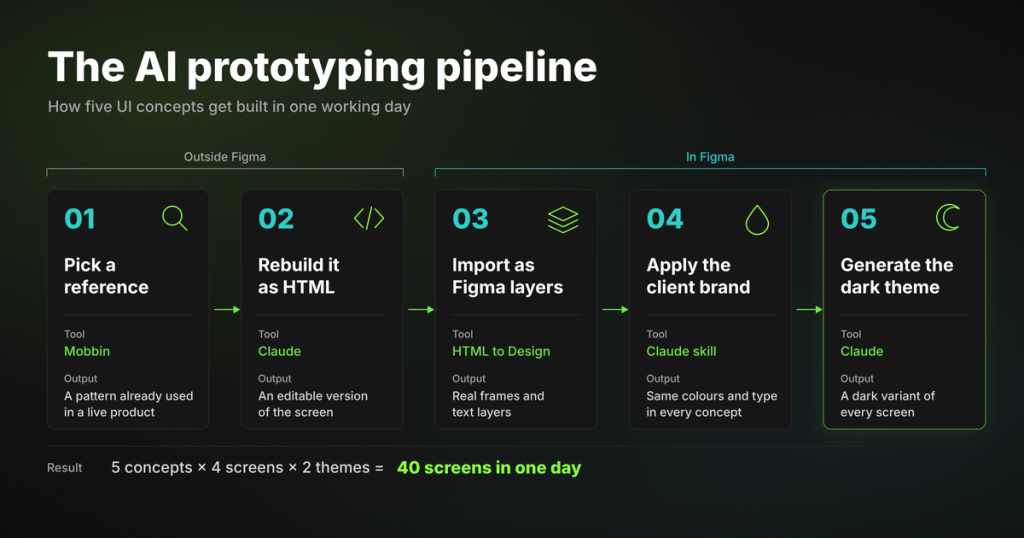
AI prototyping pipeline from a Mobbin reference to an HTML screen, Figma layers, brand translation and dark theme
“In one day I managed to generate 5 different concepts, thanks to Claude. Each one was 4 screens, and the dark theme was always generated from the light one.”
Olha Sliusar, UI/UX Designer at Kindgeek
Step 1: Start from a reference instead of a blank canvas
The references come from Mobbin, a library of screens from real products. Olha looks for a screen that already solves the structural problem she’s working on. If she needs a dashboard, she finds one with the right information density. If it’s a transfer flow, she looks for one with a clear hierarchy. That pattern is already in use in a live product, so she uses it as a starting point and pushes it in the client’s direction.
Step 2: Rebuild the screen as HTML
Olha gives Claude the screenshot and asks for an HTML version of the screen. Why HTML is the right intermediate format:
| AI-generated image | HTML | |
| Looks similar on screen | Yes | Yes |
| Can be edited, restyled or handed to a developer | No, nobody can | Yes: it has containers, text nodes, and repeatable elements |
| Lands in Figma as | Flat images | Real Figma frames and text layers |
A colleague of hers on another project found out the hard way what happens otherwise. Claude Code generated an onboarding wizard for him, but the screens landed in Figma as flat images, and he had to rebuild every one of them as layers in a second pass.
Step 3: Import it into Figma as editable layers
The HTML to Design plugin turns it into real Figma frames and text layers that a designer can adjust and turn into components.
Bonus use. The plugin also works with any page open in a browser. Olha has used it to pull a client’s existing product pages into Figma and asked Claude to break them down into a draft design system in Material Design 3 terms: tokens, components, and component states. The draft still needs her review, but for a client without a formal design system, it gives her something to build on. (Our guide to building a fintech design system covers what such a system should contain.)
Step 4: Brand translation as a repeatable skill
Once a concept is in Figma, Olha runs a dedicated skill that applies the client’s colours, typography, and branding rules. Her instruction is one line: here’s a concept, translate it into our branding.
She keeps this as a separate step for a reason. Prompt-to-design tools are unreliable at following a design system.
In a 2026 interview study of 22 product team members, a designer reported that Figma Make produced close results from a screenshot. Once she gave it her component library, it stopped following it and lost alignment as the project grew.
A skill applies the same brand rules every time. When all five concepts share one brand treatment, the client compares layouts and interaction ideas, because the colours and type are identical across all of them.
Step 5: Generate the dark theme
The dark theme comes last. Claude generates the dark variant of every screen from the light one, so both themes are part of every concept from the start.
The result
5 concepts with 4 screens each, and every screen in both a light and a dark theme: 40 screens in one working day.
Want five directions for your product before you commit to one?
Our design team runs this AI prototyping pipeline on client work: references, editable Figma layers, your brand applied by a skill, both themes from day one.
Talk to our design teamNo Single AI Prototype Generator Did the Job
Olha used four tools for the five concepts. The mix changed from concept to concept, depending on what each direction needed.
| Tool | Its job in the pipeline |
|---|---|
| Claude | Generated the HTML and handled brand translation |
| Claude Code | Took the heavier generation tasks |
| HTML to Design plugin | Moved everything into Figma |
| Google’s Stitch | Added extra visual generation |
The concepts came out genuinely different:
- one leaned into a strong blue palette
- another added a touch of skeuomorphism
- the rest differed in layout and hierarchy
The client had real alternatives to choose between.
Any one of these tools may look different in a month. The Figma study alone lists eight prompt-to-design products, from Lovable and v0 to Claude Design. What stays useful in AI prototyping for product design is the reasoning behind each step: HTML because it converts into editable layers, and a skill because brand rules have to be applied identically. With that settled, swapping a tool doesn’t break the workflow.
AI-Assisted Prototyping for Usability Testing: Validate Before Figma
In a classic validation loop, the team designs screens, builds a clickable prototype from them, tests it and redesigns. All of that design work happens before anyone learns whether the idea works for people at all.
Olha reverses that order. Ideas go to users before a single Figma screen exists, so the test checks the idea itself rather than its visual design.
| Classic validation loop | Olha’s loop | |
|---|---|---|
| Order | Design screens, build a clickable prototype, test, redesign | Hypothesis, AI prototype, test, then Figma |
| What gets tested | The designed screens | The idea itself |
| When Figma starts | At the start | Only after a direction survives testing |
| What a failed idea costs | All of the design work done before the test | The time it took to generate a prototype |
“We do rapid prototyping, feed it to a usability testing tool, and get results before touching Figma.”
Olha Sliusar, UI/UX Designer at Kindgeek
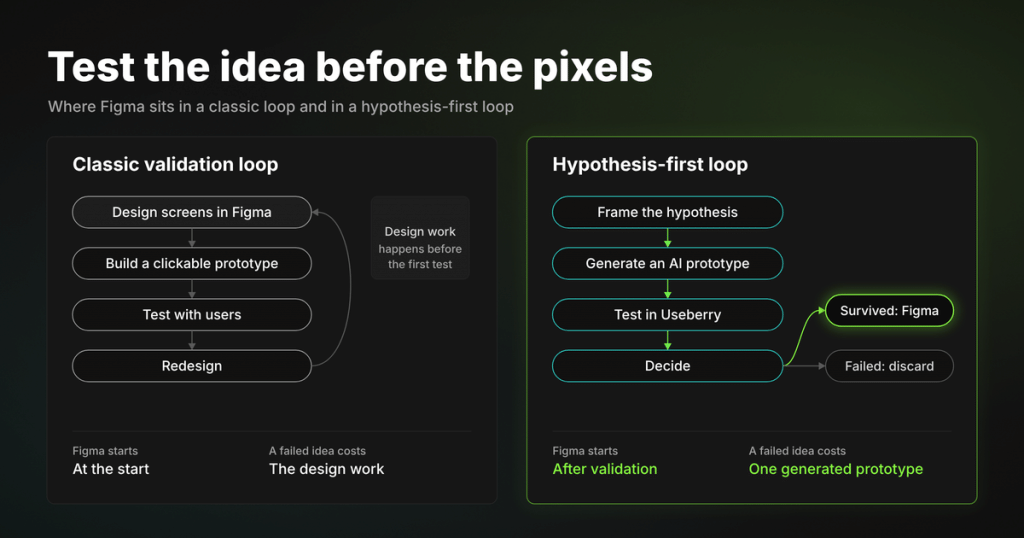
How the hypothesis-first cycle works
- Frame the hypothesis. Each cycle starts with a hypothesis about what users should be able to do or understand, together with the result that would prove the team wrong.
- Generate the prototype. AI then builds a clickable prototype of that idea.
- Test with real users. Olha loads it into Useberry and runs moderated or unmoderated sessions that record how people behave.
- Decide. A direction moves into Figma for proper design work only after it survives testing. If it fails, the team has lost the time it took to generate a prototype.
Making AI prototypes work in a testing tool
Getting the prototype into the testing tool took work. Some AI-generated prototypes were too heavy to load at all. Others loaded but broke navigation, and some didn’t expose the interactions a test task needed. Olha spent several evenings working out which prototypes Useberry accepts and wrote the rules down as an internal instruction, so the next designer on the team doesn’t have to repeat the experiments.
A side effect: prototypes that write user stories
When a prototype covers a multi-step flow with business logic already agreed with the client, AI can generate user stories directly from it.
“If prototypes are complex enough, you can generate user stories from them. It describes all the nuances quite well.”
Olha Sliusar, UI/UX Designer at Kindgeek
For a business analyst, that changes the starting point:
- Before: a BA used to write stories from meeting notes and check them against designs afterwards.
- Now: the first draft already follows the flow users have tested, edge cases included, and the BA edits it.
Where the test prototypes come from
Test prototypes come out of the rest of Olha’s AI pipeline:
- Jira-to-prototype skill: turns a user story into a prompt for a prototyping tool.
- The concept workflow above: supplies directions to test.
- Claude Design: she has also tried it, since it can use a product’s codebase as its design system.
| What worked | Component names in the prototype match the ones in code. A prototype built that way looks like the real product, so users react to the flow itself. |
| The downsides | The output became HTML and CSS, and tokens couldn’t be swapped. |
The pipeline makes prototypes cheap, and testing decides which of them deserve design time. The scarce resource is now user attention: recruiting, sessions and analysis take as long as they always did. So the team picks carefully which hypotheses go into a test.
The Designer’s Eye Still Decides
It would be easy to read AI prototyping as “AI designs now.” Olha disagrees.
“No AI tool designs well yet. Even Anthropic’s lead designer said we still have jobs as designers.”
Olha Sliusar, UI/UX Designer at Kindgeek
What still takes a designer
Each of the five concepts needed manual finishing in Figma.
Researchers see the same thing at scale. In the 22-person interview study, product teams said they still choose Figma for production work. The authors also found AI pushing different teams toward the same interaction flows.
Steering a concept away from those defaults is a designer’s job. So is choosing which of five directions fits the product. That means weighing its users, its regulatory context and its brand strategy.
Olha’s effort has moved from producing concepts to evaluating them. She compares directions, spots what works and refines the one the client picks.
What rough prototypes can’t test
Testing ideas on rough prototypes has limits too.
A rapid AI prototype shows whether people understand a flow. It can’t tell you whether the final visual design feels trustworthy, or whether the typography reads well on a small screen. Those questions still get tested later, on designed screens.
Writing a hypothesis worth testing and tasks that don’t lead participants astray remains research work that AI doesn’t do.
The cost of going first
Olha built this pipeline over evenings, while new tools and commands kept appearing every week, and she says plainly that the people who start first spend the most time. The payoff comes once a step is stable and written down, which is why our team turns every working step into a skill or an internal instruction.
What AI Prototyping Means for Fintech Product Teams
Onboarding and KYC are where financial products lose people. In Fenergo’s 2025 survey of 600 senior executives at banks, asset managers and fund administrators, 70% said their firm had lost clients in the past year because onboarding was too slow or inefficient. These flows are also the most expensive to change late, because every step touches compliance rules, back-end logic and support scripts.
Questions to test early
Testing a hypothesis early on an AI prototype answers the questions that drive those losses while they’re still cheap to fix:
- Do users understand why the app asks for proof of address at that step?
- Does showing the fee before confirmation change how many people finish a transfer?
A team can learn this before the flow is designed, specified, built and certified.
For multi-brand and white-label products
The brand-translation skill does at the concept stage what design tokens do in code: one concept, with the brand layer applied by rules. We describe the code side in our article on token-driven white-label app development.
What is AI prototyping?
AI prototyping is the use of AI tools to turn a prompt, a screenshot or an existing design into an editable or clickable prototype. Teams use it to explore several design directions and test them with users before committing manual design time.
Does AI prototyping save designers time?
It depends on the task. A 2026 randomised trial of Figma Make found about 20% shorter completion times on average, with most of the gain going to product managers. Designers improved only on the most complex task. In our work, the savings come from volume: many screens, several concepts and both themes generated at once.
Can an AI-generated prototype be used for usability testing?
Yes, if it’s built to the testing platform’s constraints. It has to load reliably, keep navigation intact and expose the interactions the test tasks need. Our team follows a written set of rules before uploading AI prototypes to Useberry.
Will AI prototype generators replace UI/UX designers?
Current evidence says no. Generated screens still need manual finishing; they drift toward the same interaction patterns, and choosing the direction that fits a product’s users and regulatory context takes a designer’s judgment. AI moves a designer’s time from producing concepts to evaluating them.