


Recently updated on July 21, 2026
At Kindgeek, we develop Flutter apps for banks, payment providers and fintech platforms and we’ve seen one question make or break the success of a project: is Flutter the right fit for your product, team and business goals?
Flutter has matured into a production-ready framework that is being used by companies such as Google Pay, Nubank, BMW, and an increasing number of banks. It has a stable rendering engine, mature tooling, and broad platform support. But those advantages don’t inherently mean that it’s the right choice for every project.
Based on Kindgeek’s experience of delivering Flutter solutions for fintech companies, this article provides a practical decision framework to help you assess the strengths of Flutter, areas for improvement and how it compares to alternatives.
Short Answer
Flutter is a great option if you want one codebase across iOS, Android, web and desktop, consistent branding, and a highly customized user experience. It is a less suitable option for apps that rely heavily on platform-specific hardware integrations or SEO-driven web content. A common codebase can make maintenance and compliance easier in regulated industries by reducing the differences in implementation between platforms but the native integrations and regulatory requirements still need to be planned carefully.
This guide is for:
- CTOs comparing Flutter with React Native or native development
- Fintech and other regulated-industry teams planning for compliance requirements
- Product leaders evaluating a cross-platform build from scratch
- Engineering teams considering a migration from native to Flutter
What Flutter Mobile App Development Means
Flutter is Google’s open-source UI toolkit for building applications from one codebase that compiles to iOS, Android, web, and desktop. Instead of writing separate iOS and Android apps in Swift and Kotlin, teams write Dart once, and the framework renders every screen through its own engine rather than by wrapping platform-native components.
That’s the core idea behind Flutter application development: a single team, a single codebase, and a UI that looks and behaves the same across devices.
It’s this design that makes the Flutter framework for mobile app development a serious alternative to native builds, not just a shortcut for MVPs.
How Flutter Works Under the Hood
Understanding how Flutter works in mobile app development is important for evaluating its strengths and limits. Every screen is a tree of widgets, rendered rather than delegated to native iOS or Android UI frameworks. On current mobile platforms, Flutter primarily uses Impeller: it is the only supported renderer on iOS and the default on Android API 29+, with a fallback available on older Android versions; Flutter Web uses CanvasKit or Skwasm instead. Impeller reduces shader-compilation-related jank and makes rendering performance more predictable, although application architecture and widget complexity still determine real-world frame consistency. Code compiles to native ARM machine code through ahead-of-time compilation for release builds, while the development cycle uses just-in-time compilation with stateful hot reload, so a developer sees UI changes in under a second and keeps app state intact.
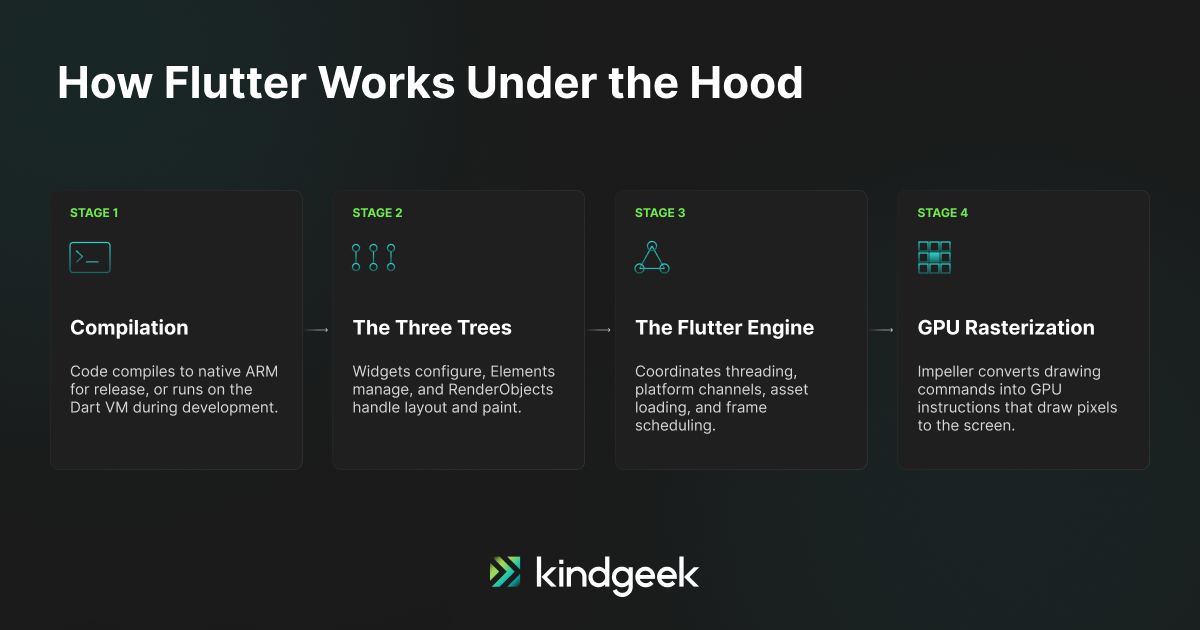
Because the rendering pipeline lives inside the app rather than in the OS, Flutter gives teams a high degree of visual consistency across platforms and device generations.
The tradeoff: a team has to deliberately track and adopt new platform design patterns, since they arrive from an OS update rather than for free.
What Flutter App Development Solves
The Single-Codebase Promise
The headline reason teams choose Flutter for mobile app development is that one codebase serves iOS, Android, and often web and desktop too. For a team building a banking app, that means one set of business logic to test, one release pipeline to maintain, and one place to fix a bug instead of two.
Kindgeek makes this case often to clients evaluating Flutter for a first product launch. Google’s own migration of Google Pay is the clearest documented example: the team rebuilt a 1.7-million-line, dual-codebase app into a single Flutter codebase, ending up with 35% less code while adding features, and estimated it saved 60 to 70% of engineer time on ongoing work.
Where the Premise Breaks Down
The single-codebase promise holds best for UI and business logic. It gets thinner once an app needs deep native integrations: Bluetooth peripherals, ARKit or ARCore, custom camera pipelines, or PCI-compliant card readers still typically need native code per platform, connected back into Flutter through platform channels. We’ve seen teams budget for one codebase and zero platform-specific work, then get surprised by scope creep later. That native layer is the piece worth estimating carefully upfront.
Where Flutter Struggles and How Teams Mitigate the Risks
Across Kindgeek’s Flutter mobile development projects, a few recurring pain points show up. Each one earns a line item in the project plan.
Native SDK and Hardware Integration
Anything that needs direct, low-level access to hardware, such as card-reader SDKs for point-of-sale hardware, tends to need native modules regardless of the cross-platform framework chosen. Flutter’s platform channels bridge this gap reliably, but they add a layer of native Swift and Kotlin code that is easy to leave out when scoping an app build with Flutter. Card readers, biometric authentication, and other deep hardware integrations follow the same pattern, so budgeting a Flutter build as pure Dart work understates the native engineering time these integrations require.
Bundle Size and Low-End Devices
Because Flutter bundles its own rendering engine inside every app, a Flutter build runs several megabytes larger than the equivalent React Native app, which can lean on platform-native UI components already present on the device. Current device storage covers this gap for most markets, though it’s worth checking if your user base skews toward low-end Android devices or markets with expensive mobile data. Every plugin and asset adds to that bundle from the start, so managing it well past launch, through code splitting, deferred components, and asset compression, tends to matter more than the size at launch.
Package and Plugin Maintenance
Flutter’s package ecosystem is smaller and more Dart-specific than npm, so it’s worth vetting the maintenance status of any plugin touching payments, biometrics, or hardware before committing to it. A plugin with an inactive maintainer can block an OS or Flutter SDK upgrade until the team forks it or replaces it, a cost worth planning for on any multi-year fintech build.
Flutter Web and SEO
This is the tradeoff most relevant to a fintech marketing site. Flutter’s own documentation is direct about it: application output is built for dynamic experiences, which search engines struggle to index.
On current mobile platforms Flutter primarily renders through Impeller, while Flutter Web uses CanvasKit or Skwasm, both of which paint the UI onto a canvas rather than real DOM elements, so crawlers see pixels rather than indexable text or links. Flutter’s own guidance for anything static or content-driven, a marketing site, a blog, a landing page, points teams toward HTML or Jaspr instead, keeping Flutter for the authenticated, app-like experience behind it.
For a fintech product, we typically split it this way: SEO-facing pages in standard HTML, and the actual banking or investing experience in Flutter. For an authenticated web app, WebAssembly builds can improve performance for computation- and rendering-heavy pages on supported browsers, such as dashboards, interactive stock charts, and transaction feeds, with CanvasKit fallback where Skwasm is unavailable.
Platform-Specific Requirements
Apple updates the UIScene lifecycle and its app review requirements on its own schedule, and Android’s Play Store compliance rules shift on a separate one. Keeping a Flutter app aligned with both means tracking two release cadences instead of the single cadence a native team would follow on its own platform.
Native development and other cross-platform frameworks carry their own versions of these same tradeoffs; naming them early keeps a project plan realistic from the start.
Flutter vs React Native: A Practical Comparison
Flutter and React Native remain the two dominant cross-platform frameworks, and both are mature enough that whether they can handle production is largely settled.
React Native’s New Architecture removes the asynchronous bridge and uses JSI, Fabric, and TurboModules for more direct JavaScript-to-native interaction, closing much of the historical performance gap, while Flutter’s Impeller engine delivers consistent frame rates for animation-heavy interfaces. Stack Overflow’s Developer Survey has tracked both among the most-used frameworks and libraries for several years running, usually within a few points of each other.
| Aspect | Flutter | React Native |
|---|---|---|
| Best fit | Pixel-identical branding, heavy custom animation, real-time data visualization such as transaction feeds or stock charts | Teams with existing React expertise, code sharing with a React web app, access to the npm ecosystem |
| Rendering approach | Renders through its own engine (Impeller, AOT compilation) for predictable frame rates | Uses native platform views rendered through Fabric, with JSI and TurboModules handling JavaScript–native interoperability |
| Learning curve | Manageable for teams coming from Java, Kotlin, or C# | Shallow for teams already working in JavaScript and web development |
| Ecosystem | Smaller, Dart-specific package ecosystem | Much larger, npm-based package ecosystem |
| Cross-platform reach | One Dart codebase covers mobile, web, and desktop from day one | Primarily mobile-focused; web support typically relies on React Native Web or a separate React web implementation |
Sources: official Flutter documentation, React Native documentation, and company engineering case studies. Last reviewed July 2026.
For the full technical rundown, including .NET MAUI and other cross-platform tools, our comparison of cross-platform development tools covers that ground in more depth than this article needs to repeat.
Flutter Cross Platform Mobile App Development: The Bigger Picture
Flutter is one of several cross-platform mobile development frameworks, alongside React Native, .NET MAUI, Kotlin Multiplatform, and Ionic. What sets Flutter apart in that field is how much of the interface it renders itself, rather than leaning on native components. Which is why the comparison above focuses on Flutter and React Native specifically rather than the full field. For most production teams today, the practical choice has narrowed to those two.
Where Companies Are Actually Building With Flutter
Flutter shows up across a wide range of verticals now, well beyond consumer MVPs:
| Industry | Example |
|---|---|
| E-commerce | Alibaba’s Xianyu marketplace, with over 200 million users, has run on Flutter since the framework’s early days, shipping UI changes simultaneously across platforms. |
| Social and on-demand platforms | ByteDance and Kakao Mobility both run production Flutter surfaces at large scale, per Flutter’s public showcase. |
| Enterprise tools | BMW’s My BMW App runs on a single Flutter codebase across dozens of regional variants, letting the company synchronize feature rollouts globally instead of maintaining parallel native builds. |
Sources: official Flutter showcase and company engineering case studies. Last reviewed July 2026.
Flutter for Fintech Apps
Why Banks Are Adopting Flutter
Regulated financial institutions have specific reasons to like Flutter beyond general cost savings. A shared codebase can reduce duplication in compliance review and make cross-platform behavior easier to compare against regulatory requirements like PSD2/PSD3 or PCI DSS, though it does not create a single complete audit surface: native plugins, backend services, cloud infrastructure, and third-party SDKs still fall under their own review paths, instead of only two parallel iOS and Android implementations that can drift out of sync. This is what makes mobile app development with Flutter appealing once compliance enters the picture.
Consistent rendering across devices also matters for anything involving transaction confirmations or account balances, where pixel differences between platforms create both a UX and a compliance headache.
Credit Agricole Bank Polska is a well-documented example. The bank built its CA24 Mobile retail banking app in Flutter with a team of roughly 250 people, including close to 30 Flutter developers, delivering more than 165 features within 11 months of build time.
Google’s Flutter team has also worked directly with fintech partners: Google Pay itself, still one of the largest production Flutter deployments, serves payment flows for over 100 million users across dozens of countries.
Visa has gone a step further and open-sourced Nova Flutter, a library of accessible UI components built to its own design system, so other companies can build consistent, compliant payment experiences on the framework.
A Practical Illustration
For a fintech client building white-label banking infrastructure, Kindgeek’s engagements typically center on how much of the compliance and audit surface can live in one shared codebase versus how much genuinely needs platform-specific handling for card processing, biometric authentication, or open banking integrations.
That native layer typically includes biometric authentication flows, secure local storage, card provisioning, transaction signing, and certificate pinning, alongside runtime protection and the release evidence auditors expect for PCI DSS scope and KYC provider integrations. Deep links into onboarding and KYC flows add another layer of platform-specific handling worth scoping early, and mobile security testing against these components typically becomes its own line item once a build moves toward production.
In one white-label banking engagement, roughly 80% of the mobile codebase remained shared across iOS and Android, while card provisioning and biometric authentication required about half a dozen native modules split between the two platforms. Identifying those modules during discovery, rather than after development began, kept the build on its original timeline instead of absorbing several weeks of unplanned scope later on.
Scoping that conversation early keeps a Flutter fintech build on budget and gives reviewers a clearer starting point for their own review.
When the UI itself is the bottleneck, we bring our white-label Flutter UI kit for fintech into that conversation to shorten the first build. It handles the commodity screens, wallets, transaction lists, and KYC forms.
Is Flutter the Right Choice? A Practical Test
Before committing, check a project against a short list of criteria rather than a general reputation:
| Question | What to Weigh |
|---|---|
| Does the UI need to look identical across iOS and Android? | If brand consistency and custom animation matter more than matching each platform’s native look and feel, Flutter fits well. |
| Does the team already know Dart, or is it starting fresh? | Flutter’s learning curve is manageable for teams coming from Java, Kotlin, or C#, more so than for a team whose expertise is entirely in JavaScript and React. |
| How much native hardware or SDK integration does the app need? | Payment terminal hardware, deep Bluetooth integrations, and certain camera or AR features still need native code regardless of the cross-platform framework. |
| Is the target market’s web presence also part of the build? | If yes, plan for a separate HTML front end for anything that needs to rank in search, and keep Flutter for the authenticated app experience. |
Decision Matrix: Flutter vs React Native vs Native
The checklist above works project by project. This matrix lines up the same decision against the three most common paths side by side:
| Requirement | Flutter | React Native | Native |
|---|---|---|---|
| Highly branded custom UI | Strong fit | Strong fit | Strong fit |
| Heavy native SDK dependency | Moderate | Moderate | Strongest |
| Existing React team | Moderate | Strongest | Weak |
| White-label product | Strong fit | Strong fit | Higher duplication |
| SEO-first public web product | Weak | Separate web layer | Separate web layer |
| Existing native codebase | Add-to-App possible | Incremental adoption possible | Lowest migration risk |
Based on Kindgeek’s project scoping experience across Flutter, React Native, and native builds. Last reviewed July 2026.
What Flutter App Development Costs
Mobile app development using Flutter is priced based on scope, region, and compliance requirements. Our own project scoping and rough 2026 ranges show this:
| Tier | Cost Range | Timeline |
|---|---|---|
| MVP | Low five figures up to around $40,000 | 6 to 12 weeks |
| Mid-complexity | $30,000 to $100,000 | 3 to 6 months |
| Enterprise or regulated-industry | $100,000 to $150,000 or more | 6 months or longer |
Assumptions: ranges reflect mobile engineering effort only, based on Kindgeek’s fintech project scoping; they exclude backend, QA, and native-integration work, which are estimated separately per project. Last reviewed July 2026.
Regional developer rates move these numbers considerably. In Kindgeek’s early-stage estimates, Flutter can reduce duplicated mobile engineering effort compared with maintaining two separate native teams, although savings vary significantly by integration complexity, region, and whether backend and QA work are included in the comparison, and that gap narrows further for apps that lean heavily on native hardware integrations.
Choosing a Flutter Development Partner
For a regulated-industry build, partner selection matters as much as the framework choice. Weigh a prospective partner against a few concrete criteria:
If you want a deeper walkthrough of team composition, engagement models, and portfolio examples, our Flutter development services page covers that ground in more depth than this checklist needs to.
| Criterion | Why It Matters |
|---|---|
| Industry-specific track record | Fintech compliance experience is its own discipline, distinct from general mobile experience. A partner who has shipped consumer apps may still be new to PSD2/PSD3 or PCI DSS review cycles. |
| Post-launch support model | A clear plan names who fixes production issues, patches vulnerabilities, and handles platform updates after launch, with defined response times rather than an open-ended promise. |
| Maintenance record | Production apps still running years after launch say more than a portfolio of recent launches. The maintenance record matters as much as the launch itself. |
Questions Worth Asking Before Signing
A short list of direct questions surfaces most of what a proposal or portfolio leaves out:
| Question | What a Good Answer Sounds Like |
|---|---|
| How do you handle native platform-channel work when a feature needs it? | A good answer names specific Swift and Kotlin engineers on the team alongside the Dart developers, with a concrete recent example. |
| How do you scope compliance review into the timeline? | Compliance review should appear as its own line item in the project plan, built in from the start rather than added once a deadline slips. |
| Can you show a maintained, multi-year Flutter codebase? | Ask for a specific example: a named app still receiving updates years after its initial release. |
Flutter is strongest when UI consistency, shared product logic, and synchronized mobile releases outweigh the cost of maintaining occasional native integrations. It is less compelling when the product depends primarily on platform-specific SDKs or document-centric web content.
Next Steps
If you’re weighing Flutter for a fintech or other regulated-industry build, our Flutter development services team can walk through your compliance requirements, existing systems, and timeline before you commit to a framework.
| Need to build an app with Flutter?Kindgeek specializes in Flutter apps for banks and fintechs where compliance, native integrations, and audit trails all have to line up. Contact us to talk through your requirements.Contact us → |
Need to build an app with Flutter?
Kindgeek specializes in Flutter apps for banks and fintechs where compliance, native integrations, and audit trails all have to line up. Contact us to talk through your requirements.
Contact us